Neops Web Client 2.1.0
Released 2025-07-09
This release brings three task-development tools into the web client. Task authors can test templates, JSON queries, and text parsers with representative input before using them in an operational workflow.
At a glance
| Tool | You provide | You get | Typical use |
|---|---|---|---|
| Jinja renderer | Variables as JSON and a Jinja template | The rendered text | Check a device configuration template before a task sends it. |
| JMESPath evaluator | JSON data and a JMESPath expression | The selected or transformed JSON | Confirm the expression used by a dashboard, table, or task argument. |
| TextFSM processor | Command output and a TextFSM template | Structured records | Test whether unstructured device output will parse into the expected fields. |
Highlights
See both the input and result of a JMESPath expression
The JMESPath evaluator places the JSON source, expression, and evaluated result in one screen. This makes it easier to adjust an expression while looking at the exact data shape it must handle.
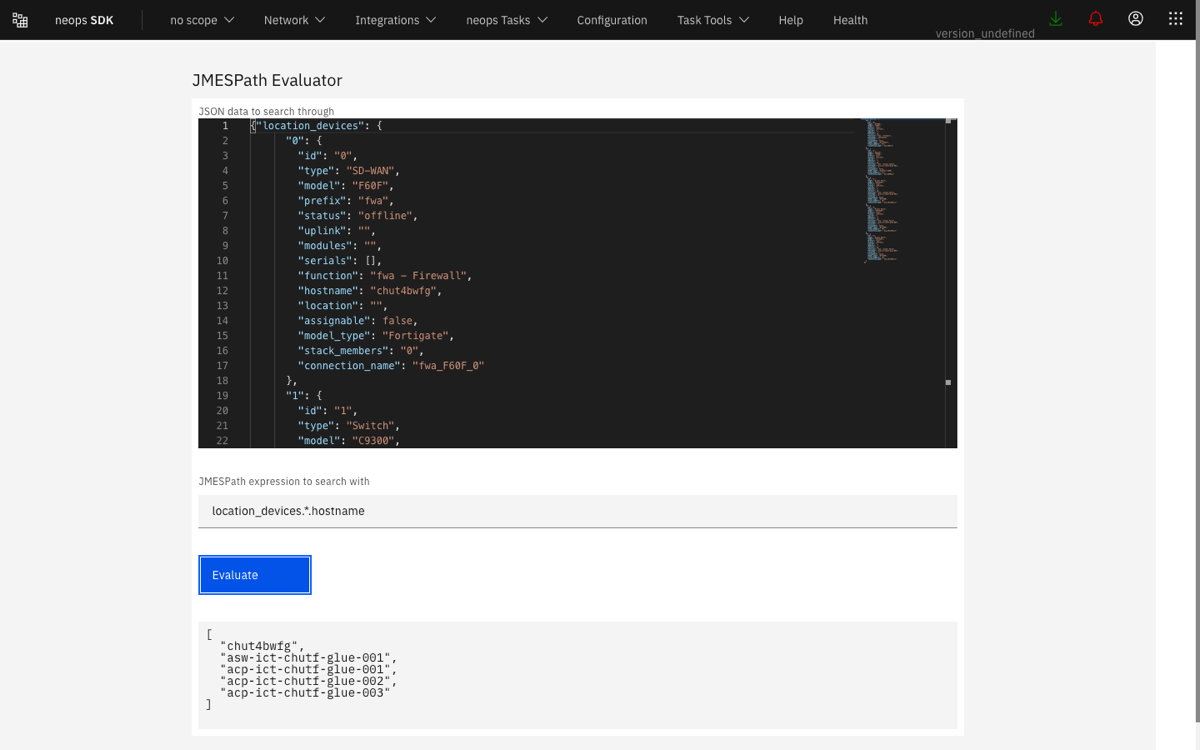
The shipped example evaluates location_devices.*.hostname and returns only the hostnames from the larger JSON document.
For example:
{
  "interfaces": [
    { "name": "GigabitEthernet0/1", "state": "UP" },
    { "name": "GigabitEthernet0/2", "state": "DOWN" }
  ]
}
The expression interfaces[?state == 'UP'].name returns:
This is useful before placing the expression in a dashboard card or table column, where a small path or filter mistake would otherwise appear only as missing data.
Render a Jinja template with realistic variables
The Jinja renderer accepts the variables as JSON and the template as editable text. Selecting Evaluate shows the rendered output without starting an operational task.
A small example is:
with these variables:
The result can be reviewed for missing variables, whitespace, loops, and conditional branches before it is used as device configuration.
Turn command output into testable records with TextFSM
The TextFSM processor brings the three parts of parser development together:
- Paste representative command output.
- Provide the TextFSM template that identifies the fields and record boundary.
- Run the processor and inspect the structured rows.
This helps distinguish a parser problem from a later task problem. When a device output variation does not match, the template can be corrected against that input before the parser is used in automation.
Fixes and improvements
- Improved generic-table styling and structure alongside the new tools.
- Kept the tools inside the same Neops shell, so users can move between task work and tool testing without a separate application.
Technical details