Neops Web Client 5.1.0
Released 2026-09-24
Web Client 5.1.0 extends sorting across dynamic device, interface, group, and client tables, makes entity pages configurable per scope, and turns the existing Workflow Manager link into an authenticated in-app workflow.
At a glance
| Area | What changed | Why it matters |
|---|---|---|
| Entity-table sorting | More device, interface, group, and client columns can sort, including timestamps, serials, locations, and relationship counts. | Users can order operational tables by the fields they use to find recent, connected, or heavily related records. |
| Entity-page layout | Entity lists and details use configurable SDK dashboards. | Each scope can replace the default table and detail dashboard without rebuilding the client. |
| Workflow Manager | The link introduced in 5.0.0 now opens an authenticated in-app /monitor page and appears only when a manager answers. |
Users keep one login, and installations without a manager no longer show a dead entry. |
| Dialogs | Every common close action uses the same unsaved-change policy. | Backdrop clicks, Cancel, Escape, and the header close button no longer discard edits without confirmation. |
| Dashboard-card documentation | All 18 public cards have a reference page and backendless Card Lab. | Dashboard authors can inspect, edit, and run real SDK card configurations against deterministic data. |
| Deployment | The client now ships a Helm chart alongside its Docker image. | Operators can configure runtime URLs, secrets, ingress, autoscaling, and pod settings through chart values. |
Highlights
Sort entity tables by more operational fields
Dynamic tables can now sort a broader set of device, interface, group, and client fields. The available keys include:
| Entity | Sortable field examples |
|---|---|
| Devices | Serial, software release, platform, creation and update time, group count, and interface count |
| Interfaces | Description, state, device hostname or IP, creation and update time, and client count |
| Groups | Title, description, location details, coordinates, and device count |
| Clients | Last discovered time, interface and device identity, location details, coordinates, and creation or update time |
This means a dashboard author can add columns such as device serial, last update, or client count and give users a working sort control for them. For example:
See every canonical sorting key in the Table card configuration.
Core advertises the keys supported by the live Elasticsearch mapping when the table loads. If a configured key is unavailable, the column remains visible but sorting is disabled with an explanation. That check keeps a configuration mistake from turning into a failed table query, but the main change is the larger set of fields users can sort.
Rebuild the Core indexes after upgrading so existing documents receive the new timestamps, serial values, and relationship counts.
Configure entity lists and details per scope
Devices, interfaces, groups, and clients now use the same dashboard system as other configurable pages. Selecting an entity opens its detail dashboard, and the navigation rail keeps that entity type selected. The former Locations entry is removed because it duplicated the groups table under another name.
Each entity type has two optional scope settings:
| Entity | List setting | Detail setting |
|---|---|---|
| Device | deviceTableConfig |
deviceDetailDashboard |
| Interface | interfaceTableConfig |
interfaceDetailDashboard |
| Group | groupTableConfig |
groupDetailDashboard |
| Client | clientTableConfig |
clientDetailDashboard |
The table setting contains the data object used by the dashboard table card.
The detail setting contains a complete dashboard configuration.
An empty object uses the SDK default, so existing scopes need no manual migration.
Use the Workflow Manager without another login
Web Client 5.0.0 introduced the optional Workflow Manager header link.
In 5.1.0, that link now opens the manager inside the client at /monitor.
The header entry appears only when the configured manager answers.
If the manager is restarting, the client retries twice before hiding the entry for that page load.
For a cross-origin manager, the Web Client sends only short-lived access tokens to the configured origin. The refresh token stays in the Web Client. Logging out also tells every connected manager window to end its session.
Set the manager URL in the deployment environment or Helm values:
The URL may point to another origin or to a path prefix routed on the Web Client’s own origin.
A same-origin root URL such as https://neops.example.com/ remains invalid because it would embed the client inside itself.
Leave the value empty when no Workflow Manager is deployed; the header entry and token relay then stay disabled.
Keep editing or discard changes deliberately
Editable dialogs now handle every common dismissal gesture the same way:
- Change a value in a dialog.
- Select Cancel, press Escape, click the header close button, or click the backdrop.
- Choose Keep editing to return to the dialog or Discard changes to close it.
Clean and read-only dialogs still close immediately, and successful Save actions close directly. Changing a value and then changing it back still counts as an edit because the policy tracks interaction instead of comparing serialized form snapshots.
Test dashboard cards with deterministic data
The dashboard-card reference now covers all 18 public cards. Each page embeds a versioned Card Lab that mounts the production SDK component and configurator with local sample data. You can switch between the guided form, expert JSON, and mock-data editors, then apply the changes to the live preview without connecting to a backend.
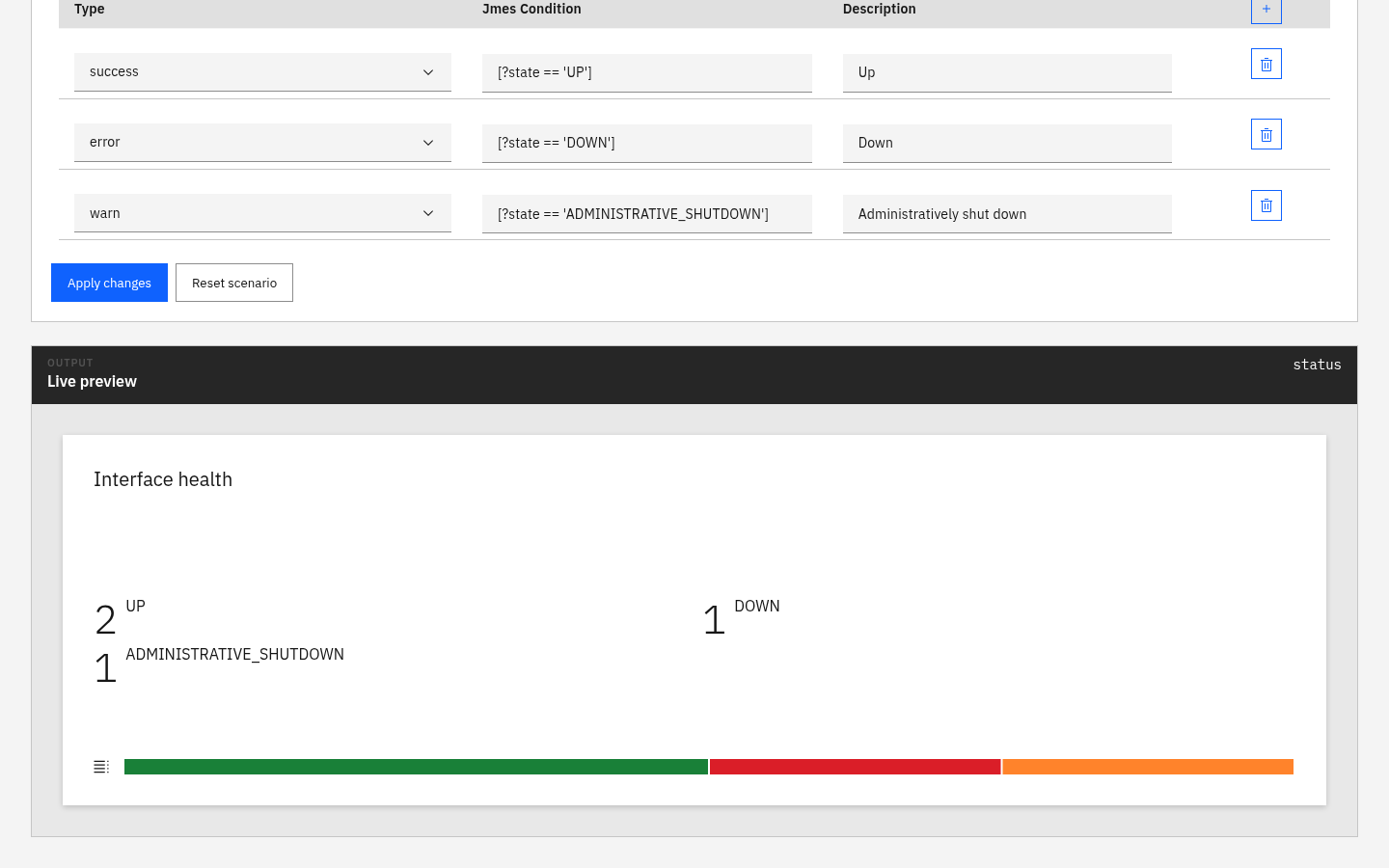
The Status card running in the Web Client 5.1.0 Card Lab with SDK 5.2.1, using the shipped mixed-interface fixture and no backend connection.
Browse the dashboard-card reference
Upgrade notes
- Deploy Neops Core 2.1.2 before relying on backend-aware sorting.
- Rebuild the devices, interfaces, clients, and groups Elasticsearch indexes after deploying Core 2.1.2.
- This release consumes Neops Web SDK 5.2.1 and
@zebbra/neops-angular-graphql-client2.1.2. - Review
FRONTEND_WORKFLOW_MANAGER_URL. Leave it empty on installations without a Workflow Manager. - The
quay.io/zebbra/neops-web-client:5.1.0image is published. - The Helm chart was packaged, but Quay rejected its registry push with
401 Unauthorized. The5.1.0chart is unavailable until that release job is rerun with working registry permissions.
Technical details
- Web Client 5.1.0 release
- Full Web Client changelog
- Included Web SDK 5.2.1 release
- Required Core 2.1.2 release